
37 lines
2.2 KiB
Markdown
37 lines
2.2 KiB
Markdown
# Pico-RTC-Clock <a href='https://ko-fi.com/cjgameslive' target='_blank'><img height='35' align='right' style='border:0px;height:46px;' src='https://storage.ko-fi.com/cdn/kofi3.png?v=6' border='0' alt='Buy Me a Coffee at ko-fi.com' /></a>
|
||
|
||
This project uses a 16x2 I2C LCD display connected to a Pico W to show the current date and time synchronized from an NTP host.
|
||
|
||
## 16×2 I2C LCD Display
|
||
|
||
A 16×2 I2C LCD Display is a type of liquid crystal display (LCD) that can display information. Each of its two lines can contain up to 16 characters. It is called an I2C LCD because it uses the I2C communication protocol to communicate with other devices, such as microcontrollers like Raspberry Pi Pico or Arduino.
|
||
|
||
## Connecting the I2C LCD to the Pico W
|
||
|
||
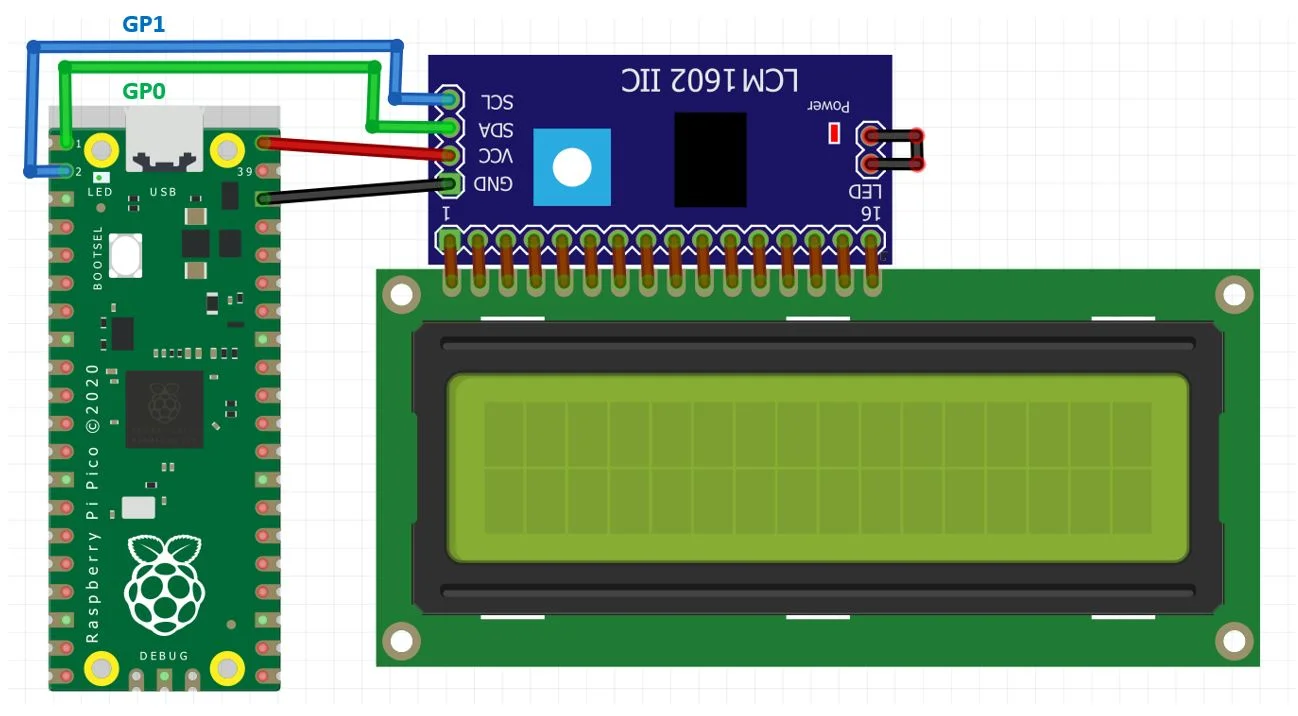
The connection between the Raspberry Pi Pico and I2C LCD is straightforward as shown below in the schematic:
|
||
|
||
|
||
|
||
| I2C LCD Display | Raspberry Pi Pico W |
|
||
| ------------- | ------------- |
|
||
| VCC VBUS pin. | This is the power from the microUSB bus (5-volts). |
|
||
| SDA | GP0 (I2C0 SDA) |
|
||
| SCL | GP1 (I2C0 SCL) |
|
||
| GND | GND |
|
||
|
||
## MicroPython Code
|
||
|
||
`secrets.py` is used to set up the Wi-Fi network by providing the SSID and password. You will need to update the Wi-Fi SSID and password in the code with your network details.
|
||
|
||
`calculate_countdown` is used to create a countdown to 09:00 Monday to Friday (the time I start work), and 17:00 (the time I finish work) once it reaches 09:00, and back to 09:00 when it reaches 17:00. On Friday/Saturday/Sunday it will count down to 09:00 on the following Monday.
|
||
```
|
||
if t[tm_wday] == 4: # Friday
|
||
target_time_9_next_weekday = time.mktime((t[tm_year], t[tm_mon], t[tm_mday] + 3, 9, 0, 0, 0, t[tm_yday] + 3, t[tm_isdst]))
|
||
else:
|
||
target_time_9_next_weekday = time.mktime((t[tm_year], t[tm_mon], t[tm_mday] + 1, 9, 0, 0, (t[tm_wday] + 1) % 7, t[tm_yday] + 1, t[tm_isdst]))
|
||
```
|
||
|
||
The `Handle backlight` section turns off the LCDs backlight between 23:00 and 07:30 so it doesn't disturb you at night.
|
||
```
|
||
if (t[tm_hour] >= 23 and t[tm_min] >= 00) or (t[tm_hour] < 7) or (t[tm_hour] == 7 and t[tm_min] < 30)
|
||
``` |